
Eight free font pairings in Canva that make Instagram posts look polished, from classic editorial to bold and playful, with tips on using them.
Two fonts, used every single time, will do more for your feed than any filter. It's step three of making your Instagram feed look cohesive. The hard part is choosing, so here are eight pairings that work, all free and all in Canva's font menu.
How a good pairing works
One font has the personality and one stays quiet. Usually that means a serif or a bold display font for headlines, and a simple sans-serif for everything else. If both fonts are trying to be interesting, they compete; if both are plain, nothing stands out.
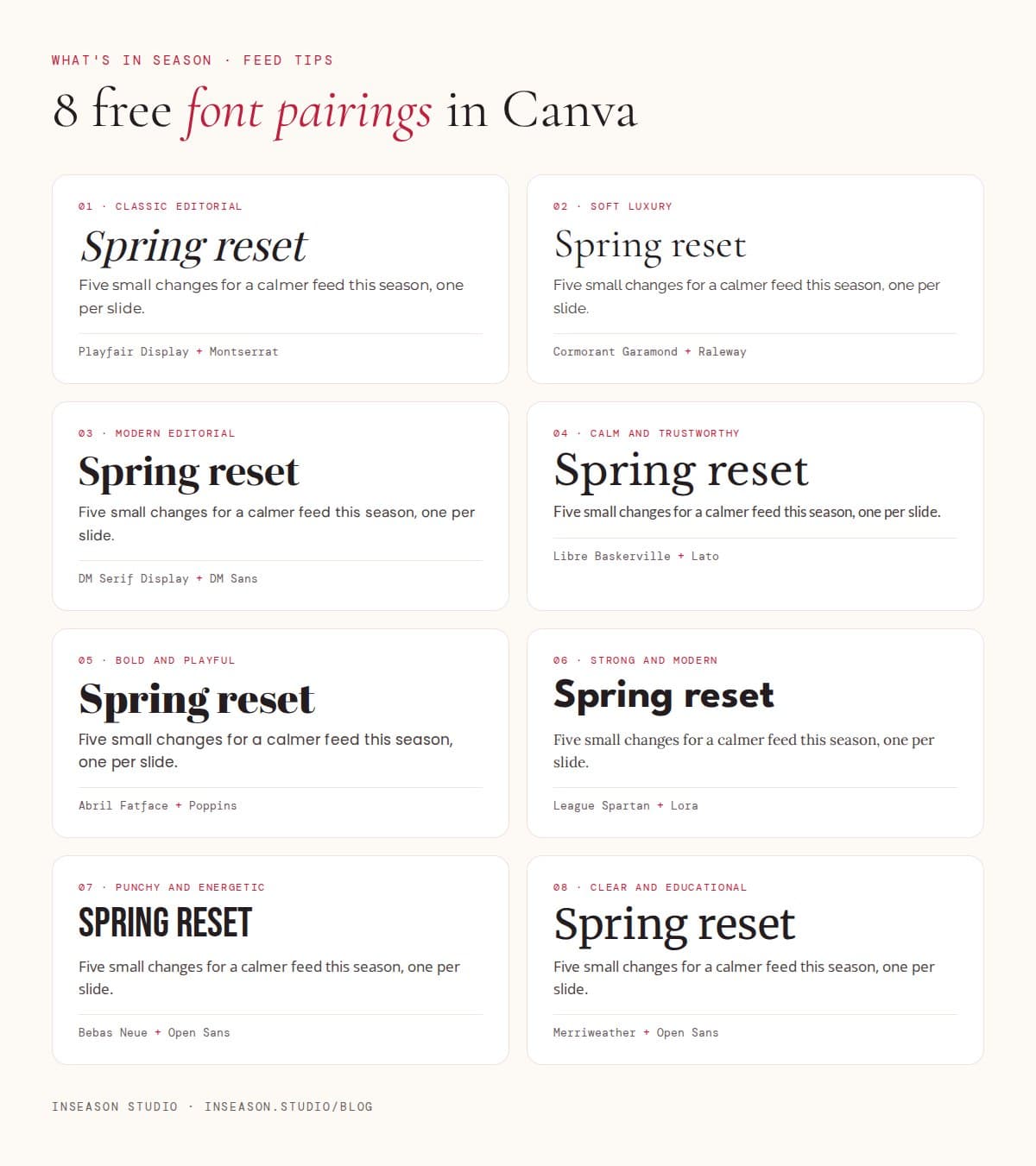
1. Playfair Display + Montserrat
Classic editorial. Playfair's high-contrast italics feel like a magazine cover, and Montserrat keeps captions crisp. A safe, elegant choice for beauty, fashion and lifestyle.
2. Cormorant Garamond + Raleway
Soft luxury. Cormorant is light and literary; Raleway is airy and modern. Ideal for wellness, bridal and anything that should feel calm and expensive.
3. DM Serif Display + DM Sans
Modern editorial. A designed-as-a-pair family, so they always match. Great for coaches, creative studios and service businesses.
4. Libre Baskerville + Lato
Calm and trustworthy. Baskerville reads like a well-made book; Lato is friendly and clear. Good for educators, health professionals and finance.
5. Abril Fatface + Poppins
Bold and playful. Abril's chunky serifs grab attention in a busy feed, and Poppins keeps it approachable. Suits cafés, events and creators with big personalities.
6. League Spartan + Lora
Strong and modern. A heavy geometric headline with a warm serif for body text. Works for fitness, architecture and confident personal brands.
7. Bebas Neue + Open Sans
Punchy and energetic. Tall capitals that read well even at small sizes. Made for personal trainers and Pilates instructors, sport and announcements.
8. Merriweather + Open Sans
Clear and educational. Both fonts were designed for reading on screens, so long carousels stay easy to follow. A strong choice for tips, how-tos and teaching content.
Adding a script accent
A handwritten or script font can add warmth, but treat it like an accent colour. Use it for one word at a time, layered over a headline, and never for full sentences. Keep it to the same script every time so it becomes part of your look.
Once you've chosen, pair your fonts with a spring colour palette and save both in your phone notes so you never choose from scratch again.
Questions people ask
How many fonts should I use on Instagram?
Two: one for headlines and one for everything else. A third script font for single accent words is the most you need.
Are these fonts free to use for business?
They're all Google Fonts, which are open-source and free for commercial use, including in Canva.
What's the most readable font for Instagram captions on images?
A clean sans-serif like Montserrat, Open Sans, Lato or Poppins at a generous size. Keep decorative fonts for short headlines.